ShopDreamUp AI ArtDreamUp
Deviation Actions




Suggested Deviants


Suggested Collections


You Might Like…


Featured in Groups




Description
DOWNLOAD FOR FULLSIZE!!!
I am really sorry for my bad english so please dont be rude im not very good in it QuQ....
speedpaint of the sketching and hair [link]
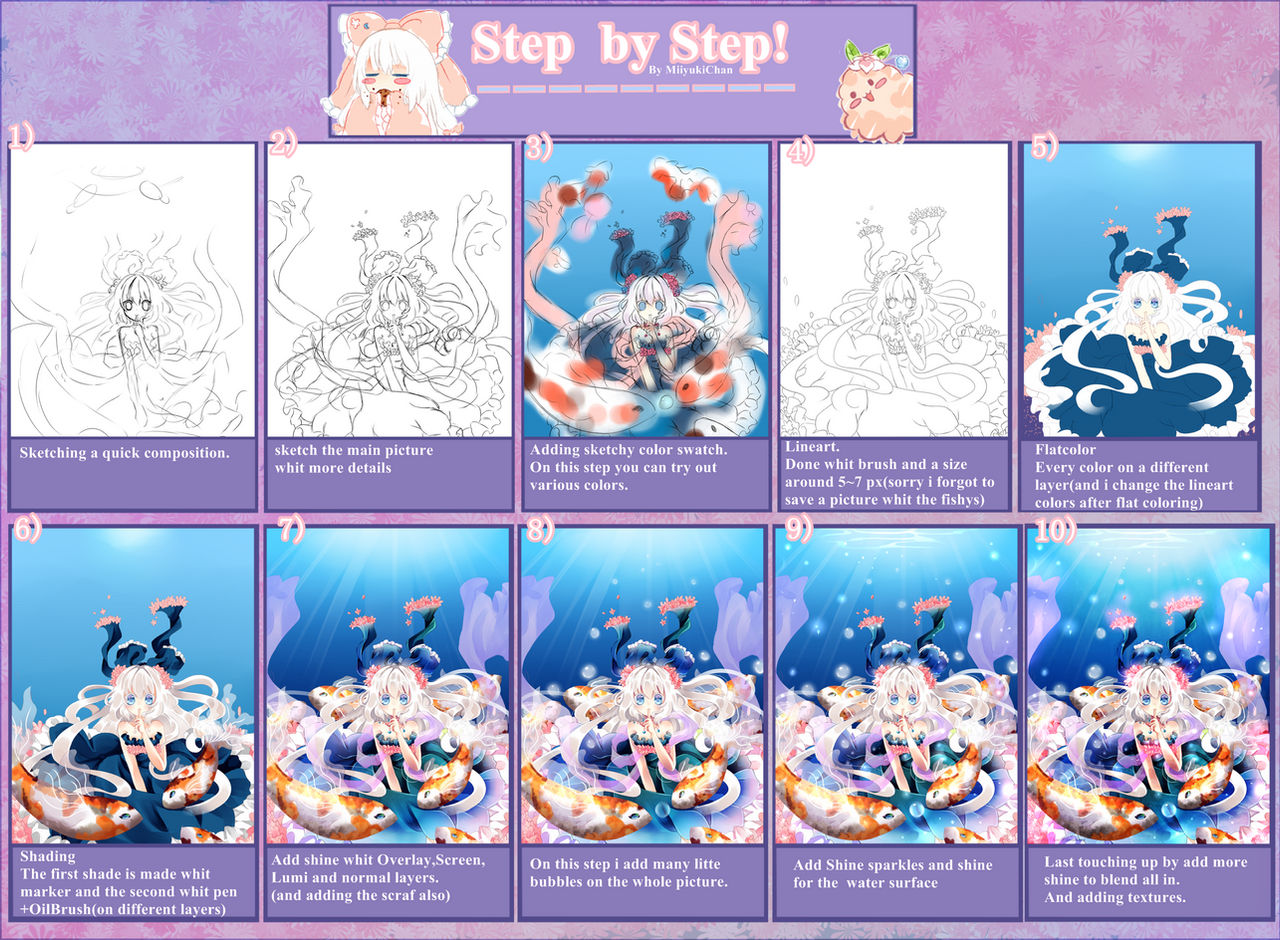
Okay my step by step from this picture

1) I ever sketch some weird compositions to know what i want to draw
2) i make a better sketch for adding all details.
3) i add a color swatch and trying out many color combinations to see what looks the best.
4) i make my lineart whit the brushsize around 5~7px and stabilizer 15. and i do hair,clothes fishys flowers and all accessoires on different layers.
Its more easywhen you want to change thecolors of the lineart.
5) i add flat colors whit the selction tool and/or bucket.
after i ad flat colors i change thecolorsfrom thelineart. and set thelineart folder one shade mode.
And i add one a seperate layer the eyes.
6) shades. i add ever 2 shades, Soft lighter shade whit the marker and on the layer above the first shade a more darker shade made whitpen and blend a bit on the edges whit theoil brush.
7) After that i add my whole shine.
Overlay layer for gardients (i make the layer above the shadeing add rainbow colors and set it to overlay+cliping it)
screen or lumi layer for lighten the edges and again a normal layer to blend it whit the backround.
8) Adding bubbles whit the airbrush and pen tool.
9) i make a new layerabove all layer and set it to lumi and draw many sparkles whit the airbrush.
10) last touching up by playing around whit hue saturation and contrast.
than i make the last shines to blend all in.
At the end i add textures to the picture.
Finish.
i hope this helps a bidfor them who really wantet to know it.
I am really sorry for my bad english so please dont be rude im not very good in it QuQ....
speedpaint of the sketching and hair [link]
Okay my step by step from this picture
1) I ever sketch some weird compositions to know what i want to draw
2) i make a better sketch for adding all details.
3) i add a color swatch and trying out many color combinations to see what looks the best.
4) i make my lineart whit the brushsize around 5~7px and stabilizer 15. and i do hair,clothes fishys flowers and all accessoires on different layers.
Its more easywhen you want to change thecolors of the lineart.
5) i add flat colors whit the selction tool and/or bucket.
after i ad flat colors i change thecolorsfrom thelineart. and set thelineart folder one shade mode.
And i add one a seperate layer the eyes.
6) shades. i add ever 2 shades, Soft lighter shade whit the marker and on the layer above the first shade a more darker shade made whitpen and blend a bit on the edges whit theoil brush.
7) After that i add my whole shine.
Overlay layer for gardients (i make the layer above the shadeing add rainbow colors and set it to overlay+cliping it)
screen or lumi layer for lighten the edges and again a normal layer to blend it whit the backround.
8) Adding bubbles whit the airbrush and pen tool.
9) i make a new layerabove all layer and set it to lumi and draw many sparkles whit the airbrush.
10) last touching up by playing around whit hue saturation and contrast.
than i make the last shines to blend all in.
At the end i add textures to the picture.
Finish.
i hope this helps a bidfor them who really wantet to know it.
Image size
2500x1835px 4.87 MB
© 2012 - 2024 Maruuki
Comments98
Join the community to add your comment. Already a deviant? Log In
You're insanely good omg, goals <3 I'm new to medibang paint :3